spring boot实现微信公众号授权登录
发表时间:2020-10-22
发布人:葵宇科技
浏览次数:134
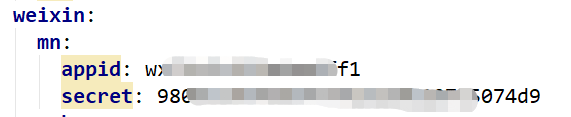
1.在配置文件中配置微信公众号的appid和secret如下图
2.controller中实现微信授权
即后台根据参数拼接url返回给前端,前端通过请求后台返回的url实现授权,实现代码如下
@Value("${app.weixin.gzh.appid}")
String appidgzh;

@Value("${app.weixin.gzh.secret}")
String secretgzh;

@PostMapping("/weixin/login")
@ApiOperation(value = "微信授权登录", httpMethod = "POST", produces = "application/json;charset=UTF-8")
public Result weixinLogin(HttpServletRequest request, HttpServletResponse response){
    try {
        Map<String,Object> map = new HashMap<>();
        //这里是回调的url
        String redirect_uri = URLEncoder.encode(rootUrl+"/weixin/callBack", "UTF-8");
        String url = "https://open.weixin.qq.com/connect/oauth2/authorize?" +
                "appid=APPID" +
                "&redirect_uri=REDIRECT_URI"+
                "&response_type=code" +
                "&scope=SCOPE" +
                "&state=123#wechat_redirect";
        map.put("datas",url.replace("APPID",appidgzh).replace("REDIRECT_URI",redirect_uri).replace("SCOPE","snsapi_userinfo"));
        return Result.ok(map);
    }catch (Exception e){
        e.printStackTrace();
        return Result.error(901,"微信授权登录失败!");
    }
}
3.微信授权后回调
前端在授权成功后会回调授权回调接口获取授权用户的openid和用户信息,实现代码如下:
@GetMapping("/weixin/callBack")
@ApiOperation(value = "微信授权回调", httpMethod = "GET", produces = "application/json;charset=UTF-8")
public Result weixinCallBack(HttpServletRequest request, HttpServletResponse response){
    try {
        Map<String,Object> map = new HashMap<>();
        //获取回调地址中的code
        String code = request.getParameter("code");
        //拼接url
        String url = "https://api.weixin.qq.com/sns/oauth2/access_token?appid=" + appidgzh + "&secret="
                + secretgzh + "&code=" + code + "&grant_type=authorization_code";
        JSONObject jsonObject = AuthUtil.doGetJson(url);
        if(jsonObject.has("errcode")){
            Integer errcode = jsonObject.getInt("errcode");
            if(null!=errcode){
                String errmsg = jsonObject.getString("errmsg");
                return Result.fail(errcode,errmsg);
            }
        }
        //1.获取微信用户的openid
        String openid = jsonObject.getString("openid");
        //2.获取获取access_token
        String access_token = jsonObject.getString("access_token");
        String infoUrl = "https://api.weixin.qq.com/sns/userinfo?access_token=" + access_token + "&openid=" + openid
                + "&lang=zh_CN";
        //3.获取微信用户信息
        JSONObject userInfo = AuthUtil.doGetJson(infoUrl);
        //去数据库查询此微信是否注册过
        User user = userService.getDao().getRepo().findByOpenidgzh(openid);
        map.put("user",user);
        map.put("userInfo",userInfo.toString());
        map.put("token", user!=null?tokenService.generate(user.getId(), 5*24*60):"");
        return Result.ok(map);
    }catch (Exception e){
        e.printStackTrace();
        return Result.error(901,"微信授权回调失败!");
    }
}
到此,微信授权就算结束了,在微信授权回调接口中,如果返回的用户是空的,前端会走用户注册接口,如果用户不为空,会走登录接口。
在上述代码中用到的工具类如下:
AuthUtil.class
import org.apache.http.HttpEntity;
import org.apache.http.HttpResponse;
import org.apache.http.client.ClientProtocolException;
import org.apache.http.client.methods.HttpGet;
import org.apache.http.impl.client.DefaultHttpClient;
import org.apache.http.util.EntityUtils;
import org.json.JSONObject;

import java.io.IOException;

public class AuthUtil {
   public static JSONObject doGetJson(String url) throws ClientProtocolException, IOException {
      JSONObject jsonObject = null;
      DefaultHttpClient client = new DefaultHttpClient();
      HttpGet httpGet = new HttpGet(url);
      HttpResponse response = client.execute(httpGet);
      HttpEntity entity = response.getEntity();
      if (entity != null) {
         String result = EntityUtils.toString(entity, "UTF-8");
         jsonObject = new JSONObject(result);
      }
      httpGet.releaseConnection();
      return jsonObject;
   }
}
另外,如果在本地测试的话,需要对本地IP做一个内网穿透,我在测试本地时,用的NATAPP做的域名映射本地,但是这个不是很好用,如果大家有好的建议,欢迎提出。